If you earn rental income in the UK, Making Tax Digital for Income Tax is no longer something you can delay thinking about. For landlords earning above £50,000, the rules are already in force from April 2026 — and the thresholds drop further in 2027 and 2028, bringing hundreds of thousands more landlords into scope.
This guide explains exactly what Making Tax Digital means for landlords, what records you need to keep, and how to meet the requirements without paying for full accounting software you don't need.
Does Making Tax Digital for Income Tax apply to landlords?
Yes — Making Tax Digital for Income Tax Self Assessment (MTD ITSA) applies to landlords, not just the self-employed.
HMRC assesses your eligibility based on your total gross income from both self-employment and property. If your rental income — alone or combined with any self-employment income — exceeds the relevant threshold, MTD applies to you.
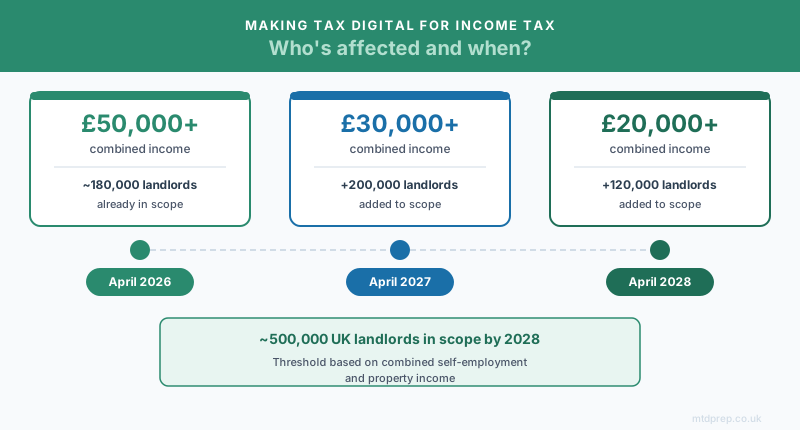
| From | Combined income threshold | Landlords affected |
|---|---|---|
| April 2026 | Over £50,000 | ~180,000 |
| April 2027 | Over £30,000 | +~200,000 |
| April 2028 | Over £20,000 | +~120,000 |
By 2028, roughly half a million UK landlords will be in scope. If you're not affected yet, you likely will be within two years.
What counts as property income under MTD?
HMRC includes the following as property income for MTD ITSA purposes:
- Buy-to-let residential properties — single or multiple properties
- Commercial property lettings
- Short-term and holiday lets — including Airbnb and similar platforms
- Rent a Room income above the £7,500 allowance
What digital records do landlords need to keep?
Under MTD ITSA, you must record each income and expense transaction individually — not as monthly totals. HMRC requires a separate digital record for every payment received and every cost incurred.
Income records must include:
- Each rental payment received, with date and amount
- The property the payment relates to
- Any other property income (deposit forfeitures, subletting, etc.)
Expense records must include:
- Date and amount of each expense
- What it was for (description)
- The correct HMRC expense category
This is where most landlords run into difficulty — not the record-keeping itself, but getting every transaction correctly categorised into HMRC's required expense categories.
What are the HMRC expense categories for property income?
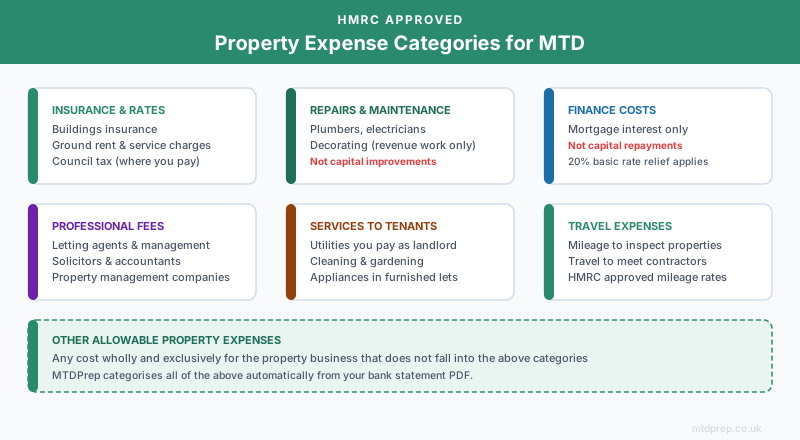
HMRC requires landlords to map expenses to specific categories. The main ones for property income are:
- Rent, rates, insurance, ground rents — buildings insurance, ground rent, service charges, factoring fees
- Property repairs and maintenance — plumbers, electricians, decorating (revenue repairs only — not improvements or extensions)
- Finance costs — mortgage interest (note: since April 2020, only basic rate tax relief is available on mortgage interest — full deduction no longer applies)
- Legal, management, and professional fees — letting agents, solicitors, accountants, property management companies
- Costs of services provided to tenants — utilities, cleaning, gardening where you pay as landlord
- Travelling expenses — mileage to inspect properties, meet contractors, etc.
- Other allowable property expenses — anything else that is wholly and exclusively for the property business
Getting these categories right is critical. HMRC's quarterly submissions require data in this format — which is exactly what bridging software expects to receive.
Do landlords need bridging software?
Bridging software is the term for HMRC-recognised tools that take your digital records and submit quarterly updates to HMRC on your behalf. If you keep your records in Excel or Google Sheets, bridging software reads those records and sends them to HMRC in the correct format.
Products like 123 Sheets, Absolute Excel, and VT are widely used, HMRC-recognised, and much cheaper than full accounting platforms. For landlords already comfortable with spreadsheets, they're the natural path to MTD compliance.
The challenge bridging software doesn't solve: getting your transactions into the right format in the first place. If your bank records are in a PDF statement, you need a way to extract and categorise those transactions before bridging software can do its job.
That's the gap MTDPrep fills.
Landlord preparing for MTD? Join the waitlist.
MTDPrep automatically categorises your rental income and expenses into HMRC's property expense categories. Upload your bank statement, review the categories, export to your bridging software. Founders get 3 months completely free.
What are the quarterly submission deadlines for landlords?
Under MTD ITSA, you'll submit four quarterly updates per tax year instead of one annual return. The deadlines are:
| Quarter | Period covered | Submission deadline |
|---|---|---|
| Q1 | 6 April – 5 July | 5 August |
| Q2 | 6 July – 5 October | 5 November |
| Q3 | 6 October – 5 January | 5 February |
| Q4 | 6 January – 5 April | 5 May |
After the four quarterly updates, you'll submit an End of Period Statement (EOPS) and a Final Declaration — the MTD replacement for the Self Assessment tax return.
Penalties for late submission are being phased in alongside mandation. The safest approach is to keep records updated throughout the year, rather than scrambling before each quarter-end deadline.
How MTDPrep helps landlords
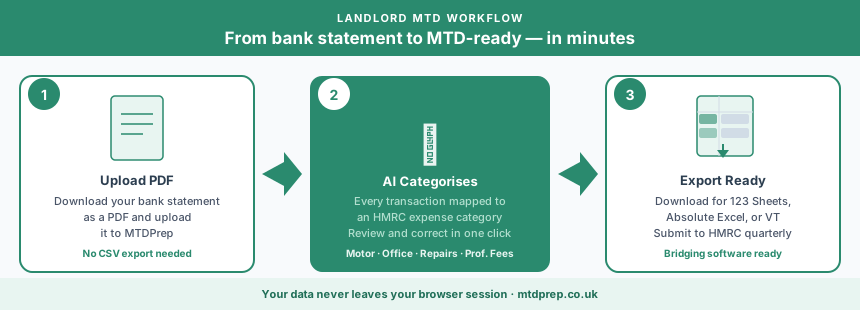
MTDPrep is built for landlords who manage their own records and want to stay compliant without the cost or complexity of full accounting software.
Step 1 — Upload your bank statement PDF. Download your property bank account statement as a PDF and upload it to MTDPrep. No CSV exports, Open Banking connections, or software integrations required.
Step 2 — Every transaction gets categorised. MTDPrep reads every transaction and assigns it to the correct HMRC property expense category. Letting agent fees, repair invoices, insurance payments, mortgage interest — each one is categorised automatically.
Step 3 — Review and correct. Every categorised transaction is shown to you for review. Anything that needs adjusting — for example, confirming whether a payment is a revenue repair or a capital improvement — takes a single click to correct.
Step 4 — Export for bridging software. Download a spreadsheet formatted for direct use with 123 Sheets, Absolute Excel, or VT. Your quarterly records are ready to submit.
Each quarter takes minutes, not hours.
Frequently asked questions about MTD for landlords
Does MTD for Income Tax apply to landlords with only one property?
Yes, if your rental income from that property exceeds the relevant threshold (£50,000 from April 2026, £30,000 from April 2027, £20,000 from April 2028). The number of properties doesn't affect your MTD obligation — the total income does.
Do I need to register separately for MTD ITSA?
Yes. When HMRC mandates MTD for your income level, you need to sign up for MTD ITSA and select compatible software. HMRC will write to you ahead of your mandation date, but you don't have to wait — you can register voluntarily before your mandation date if you want to get ahead.
Can I still use a spreadsheet under MTD?
Yes. MTD doesn't require accounting software — it requires digital records in a compatible format. If you use Excel or Google Sheets and submit via bridging software, that meets the requirement. The key is that your records must be in the correct HMRC format and your submissions must go via HMRC-recognised software.
What if I have a portfolio with multiple properties?
MTD records should be kept at a property level where possible. If you have multiple properties on the same bank account, you'll need to allocate transactions to the correct property in your records. MTDPrep processes bank statements and allows you to assign transactions — multi-property support is a core part of the product roadmap.
Does MTD apply to landlords who use an accountant?
Yes. Even if an accountant files your returns, the MTD requirement is yours — you (or your accountant on your behalf) must keep digital records and submit quarterly updates. Many landlords use MTDPrep to prepare their records and pass the export directly to their accountant.
What if my rental income drops below the threshold in a future year?
You're assessed on your actual gross income each tax year. If you drop below the threshold, you may be able to exit MTD — but you'll need to notify HMRC. The exit conditions are still being confirmed by HMRC as the rollout progresses.
Is mortgage interest still deductible for landlords under MTD?
MTD changes how you submit records, not what's deductible. The mortgage interest restriction that came into effect from April 2020 still applies — only basic rate (20%) tax relief is available, not full deduction. This is unchanged by MTD.
The bottom line
Making Tax Digital for landlords is already in effect for higher earners, and the thresholds are dropping. The record-keeping requirement itself isn't complicated — but getting every transaction correctly categorised in the right digital format, four times a year, is where most landlords need help.
The good news is that you don't need to buy expensive accounting software to meet the requirement. You need clean, categorised records and bridging software to submit them. MTDPrep handles the first part automatically.
Found this useful? Add MTDPrep as a Google Preferred Source and our MTD guides will show up whenever you search the topics we cover.