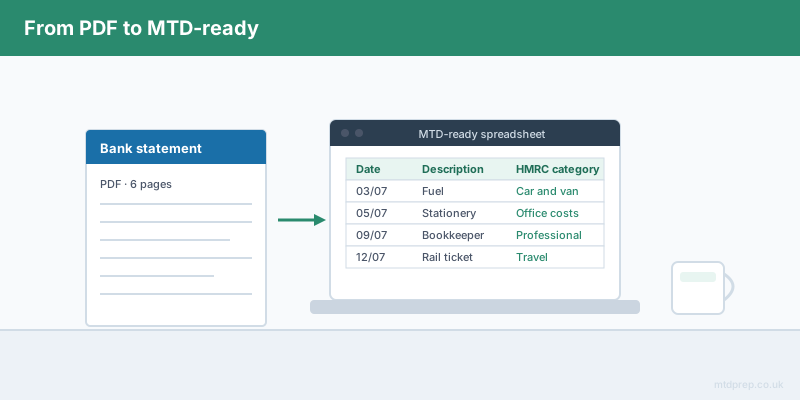
If you have searched for a bank statement converter in the UK, you are almost certainly trying to solve a real and irritating problem: your bank hands you a PDF, and your bookkeeping lives in a spreadsheet. Getting the numbers out of one and into the other by hand is slow, error-prone and completely joyless work.
But if the reason you are doing this is Making Tax Digital for Income Tax, there is something you need to know before you pick a tool. A bank statement converter gets you roughly halfway. It extracts the transactions. It does not turn them into the digital records HMRC expects you to keep, and it does not put them in a shape your quarterly update can actually use. This post explains exactly where the gap sits, and what has to happen either side of it.
What Does a Bank Statement Converter Actually Do?
A bank statement converter reads a PDF bank statement and outputs a spreadsheet — usually CSV or XLSX — with one row per transaction. You typically get three or four columns: date, description, money out, money in, and sometimes a running balance.
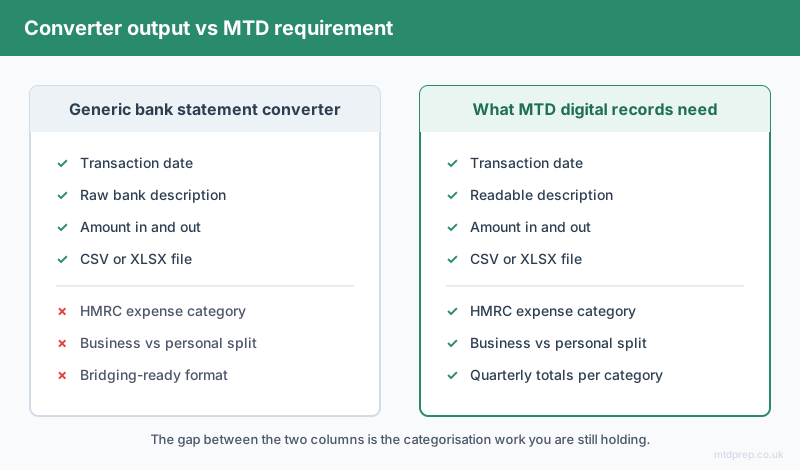
That is genuinely useful. It saves you from typing several hundred lines by hand. But look closely at what you now have: a list of every payment that left your account, in the bank's own cryptic wording. "SUMUP *ROSE CAFE", "AMZNMktplace", "DD BRITISH GAS". No indication of what is business and what is personal. No indication of which HMRC expense category anything belongs to. It is raw data, and MTD does not accept raw data.
What Does Making Tax Digital Actually Require?
Making Tax Digital for Income Tax requires two things a converter does not give you: digital records kept throughout the year, and quarterly updates summarising your income and expenses by category.
From 6 April 2026, MTD applies if your qualifying income from self-employment and property was over £50,000 in the 2024–25 tax year. The threshold drops to £30,000 from April 2027, and £20,000 from April 2028. Qualifying income means gross turnover before expenses — not your profit — which catches out a lot of people who assume they are under the line.
Under MTD you submit four quarterly updates rather than one annual return, with deadlines of 7 August, 7 November, 7 February and 7 May. Each update is a summary of income and expenses grouped into HMRC's categories. So the categorisation is not an optional nicety you can skip. It is the actual submission.
Why Isn't a Converted Spreadsheet Enough on Its Own?
Because the two things HMRC needs — categorised digital records and a submission-ready summary — both sit downstream of the conversion, and a generic converter does neither.
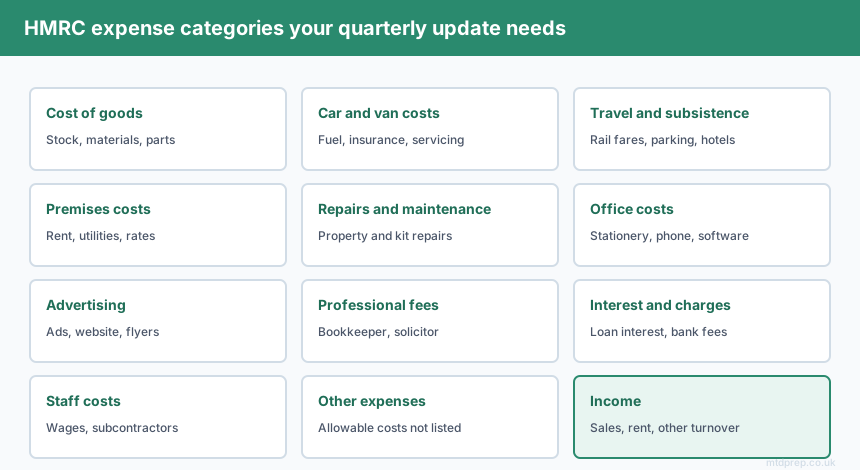
Consider what still has to happen after your converter finishes. You have to go line by line and decide whether each transaction is business or personal. You then have to assign each business transaction to an HMRC expense category: cost of goods, car and van costs, travel, premises, repairs, office costs, advertising, professional fees, interest and bank charges, staff costs, and so on. Then you have to total those categories per quarter. Then you have to get those totals into HMRC-recognised software.
For a sole trader with 200 transactions a quarter, that categorisation step is the bulk of the work. The converter removed the typing. It did not remove the thinking.
Do You Need Accounting Software to Close the Gap?
No — and this is the part that surprises people. HMRC does not require you to buy a full accounting suite. It requires HMRC-recognised software to make the submission. Bridging software does exactly that job and nothing else: it takes a spreadsheet and files it with HMRC.
123 Sheets, Absolute Excel and VT are all established bridging tools that let you keep working in a spreadsheet and submit from it. They are cheap, narrow and stable. What they explicitly do not do is help you get the data into the spreadsheet in the first place — 123 Sheets even points users towards a free PDF converter for that step.
So the honest picture of the market is this: converters solve the extraction. Bridging software solves the submission. Almost nobody solves the middle — the categorisation — unless you buy a subscription platform you do not want and did not budget for.
How MTDPrep Closes the Middle
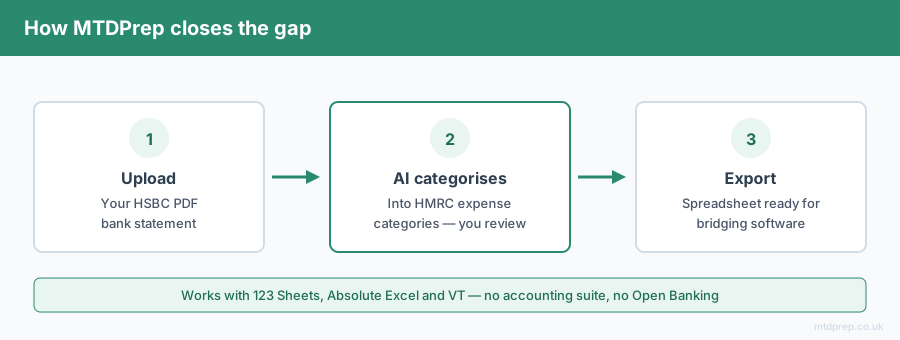
MTDPrep is built specifically for that middle step. You upload your bank statement PDF. The AI extracts the transactions — the bit a converter does — and then goes further: it categorises each one into HMRC-compliant expense categories, learns from your corrections, and exports a spreadsheet already structured for 123 Sheets, Absolute Excel or VT.
You review. You correct anything it got wrong. You export. Your quarterly update is then a matter of opening your bridging software and submitting, rather than an evening of sorting rows into columns.
No accounting suite. No bank feed. No Open Banking connection — the PDF stays a PDF upload, which for a lot of sole traders is the whole point.
What Should You Look for in a Converter If You Are Doing MTD?
If you are going to use a converter anyway, judge it on three things beyond raw accuracy.
Does it output editable data, not an image? Some tools produce a scanned-looking table you cannot sort or formula over. Useless for MTD.
Does it preserve the full description field? You need the merchant name to categorise later. Truncated descriptions make the next step harder.
Does it handle your specific bank's PDF layout? UK bank statement PDFs are not standardised. A tool that handles US statements well can fall apart on a UK bank's layout with split debit and credit columns.
And then ask the honest question: after this tool finishes, how many hours of categorisation am I still holding?
Frequently Asked Questions
Is a bank statement converter enough for Making Tax Digital?
No. A converter extracts transactions into a spreadsheet but does not assign HMRC expense categories or produce a submission-ready quarterly summary. MTD requires categorised digital records, so the conversion is only the first of three steps.
Do I need to convert my bank statements for MTD at all?
Not necessarily — you can key transactions in by hand, and some people do. But MTD requires digital records for every transaction, so if your bank only gives you PDFs, you need some route from PDF to spreadsheet.
Can I use a spreadsheet for Making Tax Digital?
Yes. Spreadsheets are still allowed, provided they are linked to HMRC-recognised bridging software such as 123 Sheets, Absolute Excel or VT for the actual quarterly submission. You do not have to buy a full accounting platform.
What are the HMRC expense categories I need to use?
The main self-employment categories include cost of goods, car and van expenses, travel and subsistence, premises costs, repairs and maintenance, office costs, advertising and marketing, interest and bank charges, professional fees, staff costs, and other allowable business expenses.
When do I have to start using Making Tax Digital?
From 6 April 2026 if your qualifying income was over £50,000 in 2024–25. From April 2027 if it was over £30,000, and from April 2028 if it was over £20,000. Qualifying income is gross turnover before expenses.
Is it safe to upload a bank statement to a converter?
It depends entirely on the provider. Check where the file is stored, how long it is retained, and whether it is used for training. A PDF upload is generally lower-risk than granting a live Open Banking connection to your account, because you control exactly what is shared and when.
A bank statement converter is a tool for a task. Making Tax Digital is a compliance obligation. They are not the same thing, and treating one as a solution to the other is how people end up in February with a folder of spreadsheets and no idea what goes in which box.
If your only problem is getting numbers out of a PDF, use a converter. If your problem is that MTD starts and you do not want to buy accounting software to deal with it, you need something that carries the job all the way to a submission-ready file.
Related: Making Tax Digital for Sole Traders 2026 · MTD Bridging Software Explained · HSBC Bank Statements and MTD
Found this useful? Add MTDPrep as a Google Preferred Source and our MTD guides will show up whenever you search the topics we cover.
MTDPrep is an independent product and is not affiliated with or endorsed by HMRC.