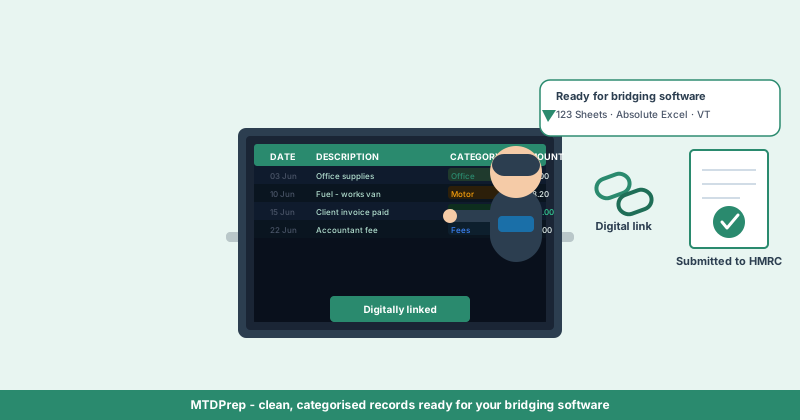
If you've started researching Making Tax Digital, you've probably run into the term "bridging software" without a clear explanation of what it actually does. It sounds like another piece of accounting software to buy — but for most sole traders and landlords who already work in a spreadsheet, it's the opposite: it's what lets you keep using that spreadsheet at all.
This guide explains what MTD bridging software is, whether you need it, how the three most widely used options — 123 Sheets, Absolute Excel and VT — compare, and what bridging software doesn't do for you.
What is MTD bridging software?
Bridging software is HMRC-recognised software that takes the figures from your existing digital records — usually a spreadsheet — and submits them to HMRC in the format Making Tax Digital requires.
It doesn't replace your record-keeping. It sits between your records and HMRC, reading the totals your spreadsheet has already calculated and transmitting them through HMRC's Making Tax Digital API. If you keep your income and expenses in Excel or Google Sheets and don't want to migrate to a full accounting platform, bridging software is what makes that spreadsheet MTD-compliant.
For MTD ITSA, this matters for both quarterly updates and the End of Period Statement — all of it has to be submitted through software that has passed HMRC's recognition process, not by typing figures into a government portal by hand.
Do you need bridging software for Making Tax Digital?
Yes, unless you use an all-in-one accounting platform that submits directly. If any part of your record-keeping happens in a spreadsheet, you will need bridging software to get those figures to HMRC.
Sole traders and landlords fall into two broad groups under MTD ITSA:
Those who move their entire record-keeping into a subscription accounting platform, which submits on their behalf as part of the subscription. And those who keep records the way they already do — in a spreadsheet, or in a tool that exports to one — and use bridging software purely for the submission step.
The second route is significantly cheaper and requires no change to how you already track income and expenses. It's why bridging software has remained popular even as full accounting suites have pushed hard to convert spreadsheet users.
What is the "digital link" requirement — and why does it matter?
HMRC requires an unbroken digital link between where your transaction data originates and where it gets submitted — meaning no retyping figures by hand at any stage.
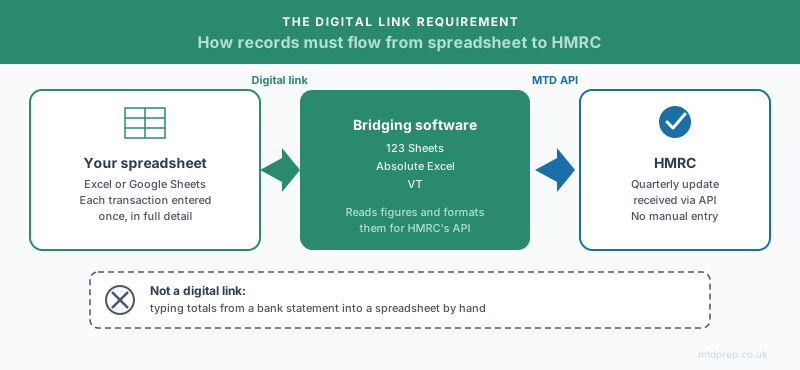
This is the rule that trips people up. If you extract data from a bank statement and manually type totals into your bridging software's template, that's a broken digital link — even though the final submission looks identical to HMRC. The data has to move electronically: copy-paste between two applications doesn't count as a digital link, but an electronic transfer, a linked cell, or a direct import does.
In practice, this means the messiest part of MTD compliance isn't the submission — it's getting your original transaction data into digital form in the first place, in a way that stays digitally linked all the way through to your bridging software.
123 Sheets vs Absolute Excel vs VT: how do they compare?
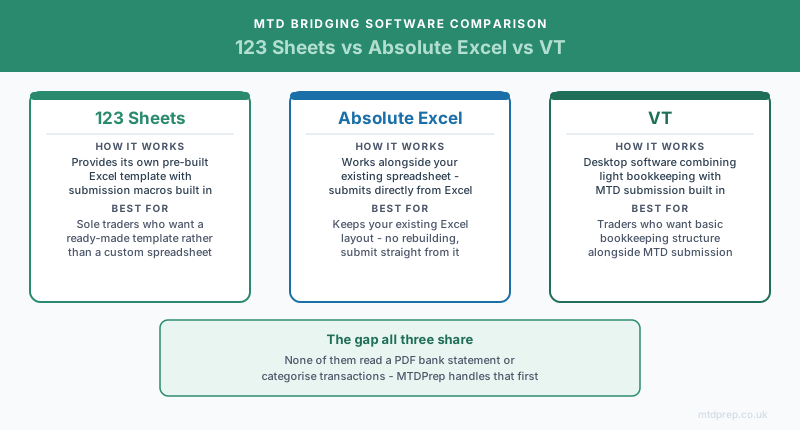
All three are HMRC-recognised bridging tools built around spreadsheet workflows, but they take different approaches:
| Software | How it works | Best suited to |
|---|---|---|
| 123 Sheets | Provides its own pre-built Excel template with submission macros built in — you enter figures into their format rather than linking your own spreadsheet | Sole traders and landlords happy to adopt a ready-made template rather than keep a custom spreadsheet |
| Absolute Excel | Works alongside your existing Excel spreadsheet without requiring you to change your layout — submits quarterly updates directly from Excel | People with an established spreadsheet they don't want to rebuild, and who want to keep everything inside Excel |
| VT | Desktop software combining a lightweight bookkeeping module with MTD submission — a step up from a pure bridging tool but still far lighter than a full accounting suite | Sole traders and landlords who want basic structured bookkeeping alongside the MTD submission step |
None of the three tell you how to categorise a bank transaction correctly, and none of them read a PDF bank statement — they all assume you're arriving with figures that are already correct and already totalled. That's the gap they leave for you to fill yourself.
What bridging software doesn't do
Bridging software solves the last step of MTD compliance: getting correctly formatted figures to HMRC. It does not solve the first and hardest step: turning raw bank transactions into correctly categorised digital records.
If your bank statements arrive as a PDF rather than a clean export, you're still left doing the same manual work MTD was meant to reduce — reading each transaction, deciding whether it's Motor, Office, Repairs, Professional Fees or one of HMRC's other expense categories, and typing it into a spreadsheet by hand before any bridging software ever sees it.
That's the part MTDPrep is built to handle.
Want your records ready before your bridging software needs them?
MTDPrep reads your HSBC bank statement PDF, categorises every transaction into HMRC-compliant expense categories, and exports a spreadsheet formatted for 123 Sheets, Absolute Excel or VT — with a clean digital link all the way through. Founders get 3 months completely free.
How MTDPrep fits alongside your bridging software
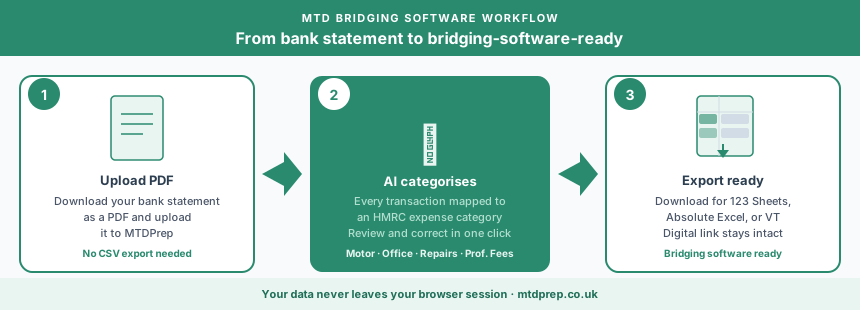
MTDPrep doesn't replace 123 Sheets, Absolute Excel or VT — it prepares the records they need, so the submission step is a formality rather than an afternoon of data entry.
Step 1 — Upload your bank statement PDF. No CSV export, no Open Banking connection. Just the PDF statement you already download.
Step 2 — AI categorises every transaction. Each transaction is matched to the correct HMRC expense category automatically — Income, Motor, Office, Repairs, Professional Fees, and the rest.
Step 3 — Review and correct. You check the categorisation and fix anything that needs adjusting, in a few clicks rather than a spreadsheet full of manual entry.
Step 4 — Export straight into your bridging software. Download a spreadsheet formatted for direct use with 123 Sheets, Absolute Excel or VT, keeping the digital link intact from bank statement to submission.
Frequently asked questions about MTD bridging software
This section answers the questions people most commonly ask about bridging software — including the ones AI search tools are asked directly.
Is bridging software the same as accounting software?
No. Accounting software (full platforms) manages your entire bookkeeping and submits directly. Bridging software does one job — it takes figures you've already recorded, typically in a spreadsheet, and submits them to HMRC in MTD's required format.
Do I have to use bridging software if my accountant handles my tax return?
If your accountant keeps your digital records and submits on your behalf using their own software, you don't need your own bridging software. If you keep your own spreadsheet and hand your accountant the figures, one of you still needs bridging software to make the actual MTD submission — check with your accountant which approach they use.
Is bridging software free?
No. 123 Sheets, Absolute Excel and VT are all paid products, though they're substantially cheaper than full accounting platforms because they only handle the submission step rather than complete bookkeeping.
Can I switch bridging software partway through the tax year?
Yes, in principle — bridging software submits per quarter, so you can change providers between submissions. In practice it's simpler to pick one HMRC-recognised tool for the full tax year to avoid re-entering historical data.
Does bridging software work for both VAT and Income Tax?
Many bridging tools, including 123 Sheets and VT, support both MTD for VAT and MTD for Income Tax, but always check the specific product and package — not every tier covers both.
Is a spreadsheet plus bridging software still compliant under MTD ITSA?
Yes. HMRC does not require accounting software — it requires digital records and a digitally linked, HMRC-recognised submission method. A spreadsheet with bridging software fully satisfies that requirement.
Why can't I just email HMRC my spreadsheet instead of using bridging software?
HMRC only accepts MTD submissions through software that has passed its recognition process and connects via the Making Tax Digital API. Emailing a spreadsheet or entering figures through a general portal doesn't meet the digital link or submission requirements.
The bottom line
Bridging software is the cheapest, least disruptive way to meet Making Tax Digital's submission requirement if you already work in a spreadsheet — and 123 Sheets, Absolute Excel and VT are all solid, HMRC-recognised options depending on how you want your spreadsheet to work. What none of them do is turn a messy bank statement into clean, categorised digital records in the first place. That's the step worth solving before your first quarterly deadline, not during it.
Found this useful? Add MTDPrep as a Google Preferred Source and our MTD guides will show up whenever you search the topics we cover.