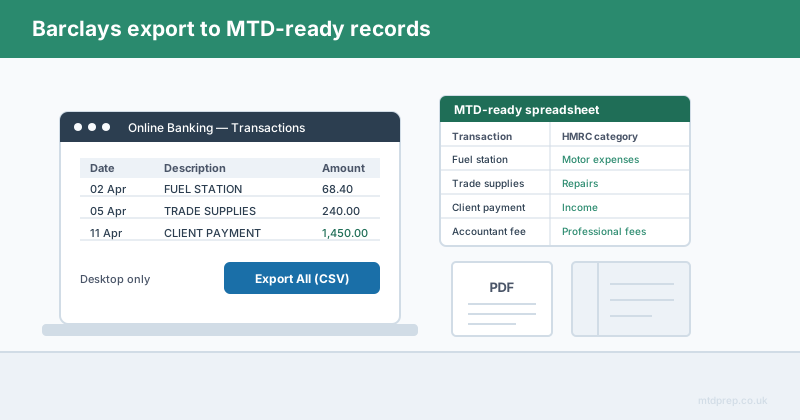
Barclays is one of the few UK banks that will still hand you a CSV file. That sounds like good news, and up to a point it is. The catch is that the export is narrower than most people expect, it only exists on desktop, and even when it works perfectly, what lands in your spreadsheet is nowhere near what Making Tax Digital asks for.
If you bank with Barclays and you are a sole trader or landlord coming into scope for MTD for Income Tax, this post covers how to get the Excel or CSV export, where it runs out, and what has to happen between that file and a quarterly update to HMRC.
How Do You Download a Barclays Bank Statement as Excel or CSV?
You export Barclays transactions to CSV from Online Banking on a desktop browser, not from the mobile app.
The route is buried a few menus deep. Log in to Barclays Online Banking, select the account you want and click "Show recent transactions". Scroll to the bottom of that list and choose "View all transactions". From there, set a date range, click "Search", and then use the "Export All" option at the foot of the screen — CSV is one of the format choices offered.
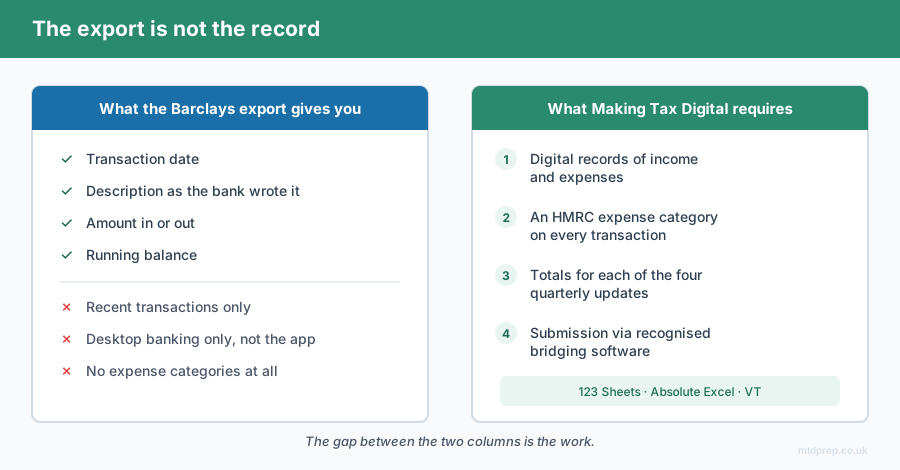
Open that CSV in Excel and you have a workable spreadsheet: a row per transaction, with date, description, amount and running balance. For a sole trader who has been dreading a stack of PDFs, that is genuinely a better starting point than most UK banks give you.
Why Is the Barclays Excel Export More Limited Than It Looks?
The export covers recent transactions only, and it does not exist in the Barclays mobile app.
Those two limits catch people out at exactly the wrong moment. The date range you can pull is restricted to relatively recent activity — it is not designed as an archive tool. If you are catching up on a tax year that closed months ago, or reconstructing records for an account you have not touched in a while, the transactions you need may sit outside the export window entirely. What you get offered instead is the PDF statement.
The mobile-only problem is quieter but just as real. A large number of sole traders and landlords never open desktop banking at all; the app is their bank. If that is you, the CSV export effectively does not exist, and you are back to downloading PDF statements one month at a time.
And there is a third limit that has nothing to do with Barclays. Even a perfect CSV, covering every transaction of the year, is not an MTD digital record. It is a list of payments.
Is a Barclays CSV Export a Valid MTD Digital Record?
No. A raw bank export is a starting point, not a digital record in the sense MTD means.
Under MTD for Income Tax you have to keep digital records of your business income and expenses, categorised, and send a quarterly update to HMRC through software that can talk to HMRC's systems. The bank gives you a date, a description and an amount. It does not tell HMRC that the £68.40 to a fuel station was motor expenses, or that the £240 to a tradesperson was repairs and maintenance rather than a capital improvement.
That gap — between a list of transactions and a set of categorised, totalled, submittable records — is the entire job. It is also the part nobody warns you about when they tell you Barclays "does CSV".
What Does MTD Actually Require From a Barclays Account?
Four things: digital records, HMRC expense categories, quarterly totals, and submission through recognised software.
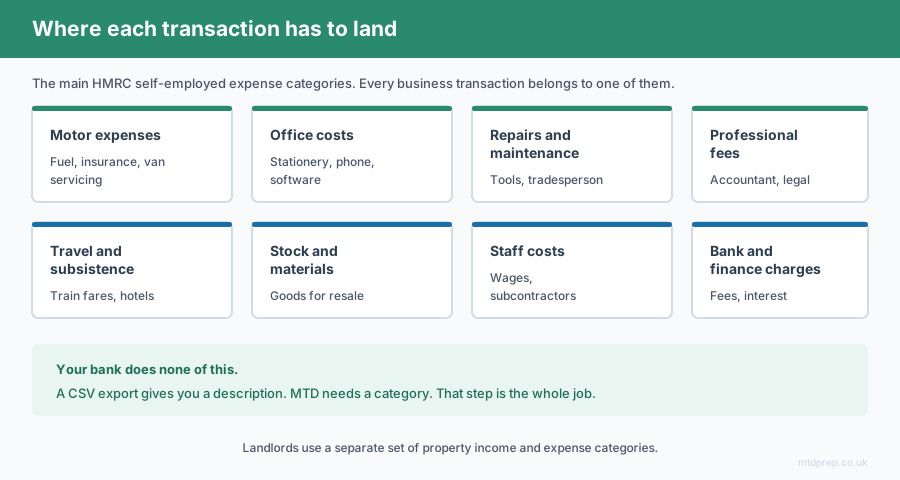
The categorisation step is where the time goes. Every business transaction has to land in one of HMRC's self-employed expense categories — motor expenses, office costs, repairs and maintenance, professional fees, travel and subsistence, stock and materials, staff costs, bank and finance charges, and so on. For a landlord the property categories differ again. Get a category wrong and your quarterly figures are wrong; get enough of them wrong and your year-end position is wrong.
For a sole trader with a few hundred transactions a year, doing that by hand in Excel is an evening's work per quarter, every quarter, forever. It is not difficult. It is just relentless.
Do You Have to Buy Accounting Software to Handle This?
No. Bridging software lets you keep working in a spreadsheet and still submit to HMRC.
This is the piece most people miss. HMRC recognises bridging software — tools such as 123 Sheets, Absolute Excel and VT — which take a properly formatted spreadsheet and submit the figures to HMRC on your behalf. You do not have to migrate your books into a full accounting platform, learn a new interface, or pay a monthly subscription for features built for businesses ten times your size.
What bridging software will not do is fill the spreadsheet in for you. 123 Sheets, to its credit, is upfront about this — its guidance for PDF users is essentially to go and find a converter. That is the missing link: something that turns a Barclays statement into a categorised, HMRC-shaped spreadsheet that bridging software can then submit.
How MTDPrep Closes the Gap
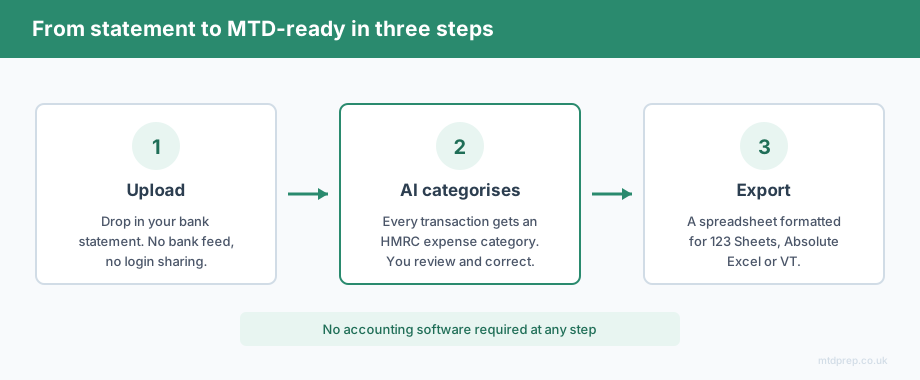
MTDPrep takes the bank statement you already have and does the categorisation you would otherwise do by hand.
You upload the statement — Barclays included — the AI extracts every transaction and assigns each one to an HMRC expense category, you review and correct anything it has read differently to you, and you export a spreadsheet formatted for 123 Sheets, Absolute Excel or VT. No accounting software. No bank feed. No handing over your online banking credentials to anything.
Frequently Asked Questions
Can you download a Barclays bank statement as an Excel file?
You can export Barclays transactions as a CSV file, which opens directly in Excel. The export is available in Online Banking on a desktop browser under "View all transactions" → "Export All", and is not available in the Barclays mobile app.
How far back can you export Barclays transactions to CSV?
The CSV export is limited to recent transactions rather than your full history. For older periods, archived statements or closed accounts, Barclays generally offers PDF statements instead, which is why many sole traders end up converting PDFs anyway.
Is a Barclays CSV export enough for Making Tax Digital?
No. A CSV export gives you date, description, amount and balance, but MTD for Income Tax requires each business transaction to be categorised into HMRC expense categories, totalled by quarter and submitted through recognised software.
Do you need accounting software to submit MTD with a Barclays account?
No. HMRC-recognised bridging software such as 123 Sheets, Absolute Excel and VT allows you to submit quarterly updates from a properly formatted spreadsheet, without moving to a full accounting platform.
What HMRC expense categories do sole traders use for MTD?
The main self-employed categories include motor expenses, office costs, repairs and maintenance, professional fees, travel and subsistence, stock and materials, staff costs, and bank and finance charges. Landlords use a separate set of property income and expense categories.
When does MTD for Income Tax apply to me?
MTD for Income Tax applies from April 2026 to sole traders and landlords with qualifying income above £50,000, from April 2027 above £30,000, and from April 2028 above £20,000.
Barclays gives you more than most UK banks — a real CSV export, if you are on desktop and the transactions are recent enough. But an export is not a record. The work MTD actually asks of you starts after the download: categorising every transaction the way HMRC expects to see it, quarter after quarter. That is the part worth automating, and it is the part MTDPrep exists to do.
Related: Making Tax Digital for Sole Traders 2026 · MTD Bridging Software Explained · HSBC Bank Statements and MTD
Found this useful? Add MTDPrep as a Google Preferred Source and our MTD guides will show up whenever you search the topics we cover.
MTDPrep is an independent product and is not affiliated with or endorsed by HMRC.