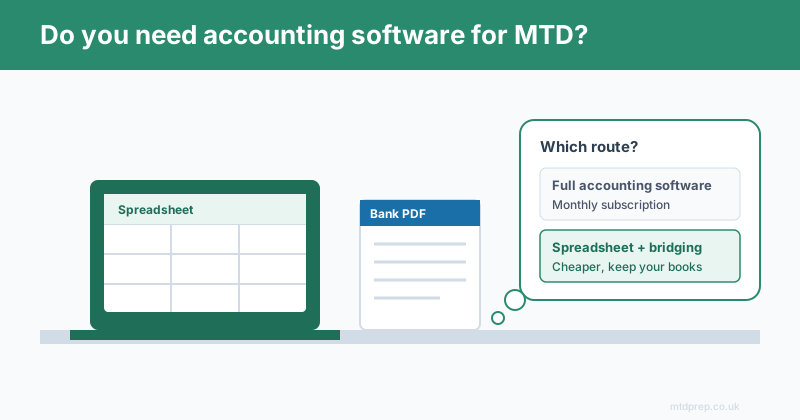
Short answer: no. You do not need to buy full accounting software to comply with Making Tax Digital for Income Tax. HMRC's rules require you to keep digital records and submit quarterly updates through compatible software — but that "compatible software" can be a spreadsheet paired with bridging software, not a full monthly subscription platform. If you already track your income and expenses in Excel or Google Sheets and don't want to move to a full accounting suite, you have a legitimate, HMRC-recognised route that costs far less.
This post explains exactly what MTD requires, why a spreadsheet plus bridging software is enough for most sole traders and landlords, where the hidden work actually sits, and how to stay compliant without changing the way you already work.
What Does Making Tax Digital Actually Require?
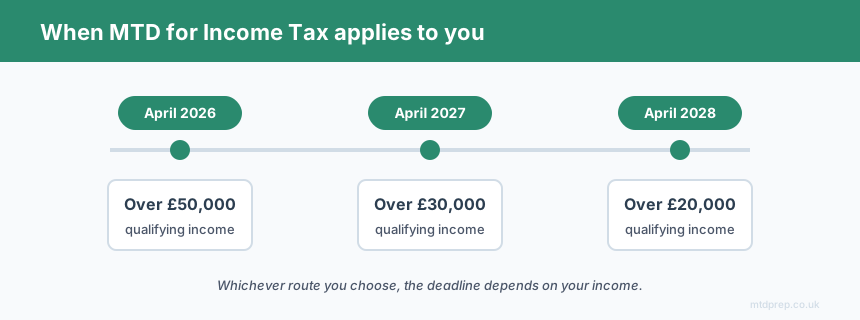
MTD for Income Tax requires two things: keep your income and expense records digitally, and submit them to HMRC through compatible software rather than by typing figures into an annual online form. From April 2026, this applies to sole traders and landlords with qualifying income over £50,000. It extends to those over £30,000 from April 2027, and over £20,000 from April 2028.
Under MTD you submit four cumulative quarterly updates during the tax year, followed by an End of Period Statement and a Final Declaration that replaces the old Self Assessment return. Every one of those submissions has to travel from your records to HMRC through software that connects to their system. What the rules do not say is that the software has to be a full accounting package. That distinction is where most of the confusion — and unnecessary spending — comes from.
Do I Need Accounting Software, or Is a Spreadsheet Enough?
A spreadsheet is enough, provided it connects to HMRC through bridging software. HMRC explicitly recognises two routes to compliance. The first is all-in-one accounting software that stores your records and submits them itself. The second is keeping your records in a spreadsheet and using bridging software — a small tool that reads your quarterly totals and files them with HMRC in the required format.
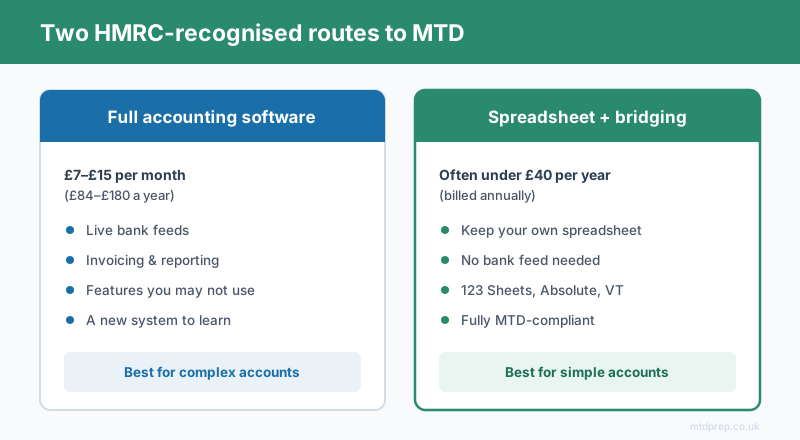
Bridging software exists precisely so that people who live in spreadsheets don't have to abandon them. Well-known bridging tools for Income Tax include 123 Sheets, Absolute Excel, and VT — and they are typically far cheaper than a monthly accounting subscription, often billed once a year. If your books are already a tidy spreadsheet, adding bridging software makes them MTD-compliant without you learning a new system.
Why Do So Many People Assume They Need Full Accounting Software?
Because the companies selling full accounting software have the biggest marketing budgets, and because HMRC's own "find software" tool lists the large subscription platforms prominently. The genuine bridging route is there — you have to filter for "software that connects to your records" to see it — but it's easy to miss. The result is that a lot of self-employed people conclude they must pay £7–£15 a month for a full suite they'll only use for one screen: the quarterly submission.
For a landlord with a handful of transactions a month, or a sole trader who reconciles their accounts once a quarter, that's a lot of subscription for very little. The spreadsheet-plus-bridging route keeps you compliant and keeps your costs measured in pounds per year, not pounds per month.
Where's the Catch With the Spreadsheet Route?
The catch isn't the submission — bridging software handles that cleanly. The catch is getting your data into the spreadsheet in the first place, correctly categorised. Bridging software takes your finished totals and files them, but it does nothing to help you produce those totals. You still have to take every line off your bank statement and sort it into the right HMRC expense category.
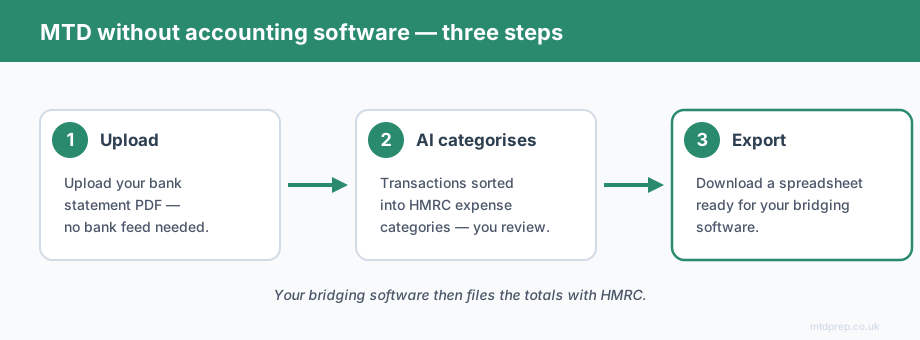
That's the real work, and it's the reason some people give up and buy a full package with bank feeds. But bank feeds bring their own privacy trade-off — you're granting a third party ongoing access to your account. There's a middle path: upload your bank statement PDF, let AI extract every transaction and sort it into HMRC categories like Motor expenses, Office costs, Repairs and maintenance, and Professional fees, review the result, and export a clean spreadsheet ready for your bridging software. You keep the spreadsheet route, you skip the manual sorting, and you never have to connect a live bank feed. That's exactly the gap MTDPrep fills — the categorisation work, without the subscription and without the bank connection.
What Does the Spreadsheet Route Actually Cost Versus a Full Suite?
Roughly a tenth of the price, in most cases. Full accounting software for a sole trader or landlord typically runs £7–£15 a month, which is £84–£180 a year. Bridging software is commonly billed annually and often lands under £40 a year. The saving is real, and for a simple set of accounts you give up very little — you don't need customised profit-and-loss reports or cash-flow forecasting to file four quarterly totals and a year-end declaration.
The one thing the spreadsheet route asks of you is that your records are accurate and well-categorised before they reach the bridging tool. Get that part right and the compliance itself is genuinely straightforward.
Which Route Is Right for Me?
Choose the route that matches how complex your finances actually are. If you have a lot of transactions, employees, VAT to reclaim, or an accountant who wants to see your underlying records inside a shared system, a full package may be worth the monthly cost. If you're a sole trader or landlord with a manageable number of transactions who already keeps a spreadsheet and resents the idea of a subscription, the spreadsheet-plus-bridging route is built for you — and it is fully compliant.
The decision isn't about which is "proper". Both are HMRC-recognised. It's about matching the tool to the size of the job, and not paying monthly for features you'll never open.
Frequently Asked Questions
Do I legally need accounting software for Making Tax Digital?
No. You legally need to keep digital records and submit them through MTD-compatible software. That compatible software can be a spreadsheet connected to bridging software — it does not have to be a full accounting package.
Can I keep using a spreadsheet under MTD for Income Tax?
Yes. A spreadsheet is a valid digital record. To make it MTD-compliant you pair it with bridging software such as 123 Sheets, Absolute Excel, or VT, which files your quarterly totals with HMRC.
What is bridging software?
Bridging software is a small tool that reads the totals from your spreadsheet and submits them to HMRC in the required digital format. It provides the "digital link" HMRC requires without you switching to a full accounting system.
Is bridging software cheaper than accounting software?
Usually, yes. Bridging software is often billed once a year and can cost under £40 annually, while full accounting subscriptions typically run £7–£15 a month, or £84–£180 a year.
What's the hardest part of doing MTD with a spreadsheet?
Categorising your bank transactions into the correct HMRC expense categories. Bridging software submits your finished totals but doesn't help you produce them. Tools like MTDPrep handle that categorisation step from a bank statement PDF.
Do I have to connect my bank account to comply with MTD?
No. Bank feeds are a feature of some accounting packages, not an MTD requirement. You can meet the rules using a spreadsheet you fill in yourself, or by extracting transactions from a bank statement PDF — no live bank connection needed.
You do not need to buy full accounting software to comply with Making Tax Digital. A spreadsheet paired with bridging software is a legitimate, HMRC-recognised, and far cheaper route — and it lets you keep working the way you already do. The only genuinely fiddly part is turning your bank statement into a clean, correctly categorised spreadsheet, and that's a problem you can solve without a subscription or a bank feed.
If you'd rather skip the manual categorising, MTDPrep turns your bank statement PDF into a bridging-software-ready spreadsheet in minutes.
Related: Making Tax Digital for Sole Traders 2026 · Making Tax Digital for Landlords · HSBC Bank Statements and MTD
Found this useful? Add MTDPrep as a Google Preferred Source and our MTD guides will show up whenever you search the topics we cover.
MTDPrep is an independent product and is not affiliated with or endorsed by HMRC.