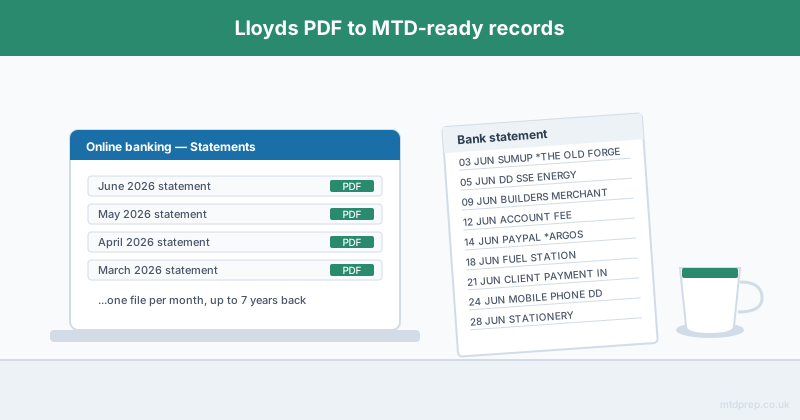
Downloading a Lloyds bank statement is easy. Turning it into something Making Tax Digital will accept is the part nobody warns you about.
If you are a sole trader banking with Lloyds and you are in scope for MTD for Income Tax, you are about to need every business transaction from the tax year in a digital record, sorted into HMRC's expense categories, totalled by quarter. Your bank will happily hand you a stack of PDFs. What it will not do is any of the rest. This post covers how to get the statements out of Lloyds, how far back you can realistically go, and what has to happen between that download and a quarterly update.
How Do You Download a Lloyds Bank Statement as a Sole Trader?
You download Lloyds statements from Internet Banking or the mobile app, and they come as PDFs.
In Internet Banking, log in, select the account, open the Statements section, choose the month you want and use the download icon that sits above your recent transactions. The mobile app follows the same path. Both give you a month-by-month PDF — one file per statement period, exactly as it would have arrived in the post.
If you run a Lloyds Business account, the route is the same but the statement layout differs slightly from a personal account, and business statements sometimes carry additional fee lines that need categorising separately. Worth knowing before you assume every row is a trading transaction.
How Far Back Can You Get Lloyds Statements?
Lloyds Internet Banking gives you access to statements up to seven years old, and the mobile app typically holds at least ten years.
That is generous by UK banking standards, and it matters more than it sounds. HMRC expects self-employed records to be kept for at least five years after the 31 January submission deadline of the relevant tax year. If you have been putting off your bookkeeping, the history is almost certainly still there — you just have to download it one month at a time, which is where the tedium starts. A full tax year is twelve separate PDFs, and if you are catching up on a couple of years you are looking at twenty-four downloads before you have even opened a spreadsheet.
Does a Downloaded PDF Count as a Digital Record for MTD?
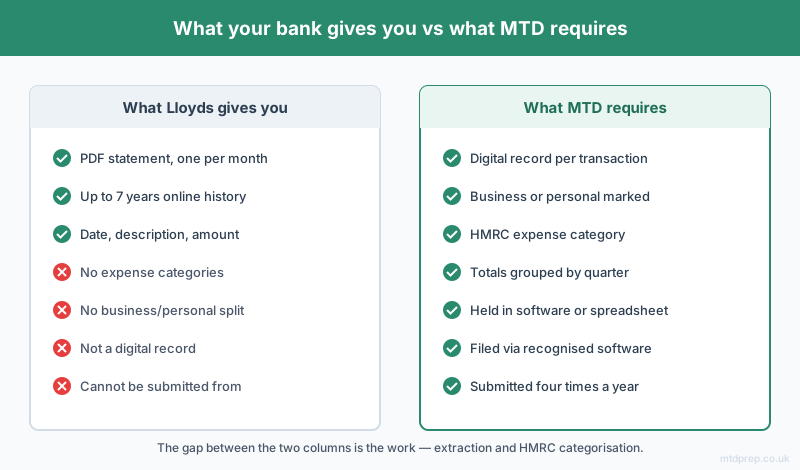
No. A PDF bank statement is not a digital record under Making Tax Digital.
This is the single most common misunderstanding, and it is worth being blunt about. HMRC's requirement is that you keep digital records of each individual transaction — date, amount, and the category it belongs to — in software or a spreadsheet that can be linked to an HMRC-recognised submission. A PDF is a picture of a statement. You cannot sort it, total it, or submit from it. Storing your PDFs in a tidy folder feels like compliance. It is not.
To turn a Lloyds PDF into an MTD digital record, three things have to happen. The transactions have to come out of the PDF and into a spreadsheet. Each one has to be marked business or personal. And each business transaction has to be assigned an HMRC expense category.
Which HMRC Categories Do Lloyds Transactions Need to Be Sorted Into?
Every business transaction has to land in one of HMRC's self-employment expense categories.
The main ones are cost of goods bought for resale, car and van expenses, travel and subsistence, premises costs, repairs and maintenance, office costs including stationery and phone, advertising and marketing, interest and bank charges, professional fees, staff costs, and other allowable business expenses. Income sits separately as turnover.
The awkward part with any bank statement is that the description field rarely tells you what you need. "SUMUP *THE OLD FORGE", "DD SSE ENERGY", "PAYPAL *ARGOS" — none of those announce their category, and several of them could sit in two. Bank charges on a Lloyds business account are an easy one. A £43 payment to a builders' merchant is a judgment call between repairs and cost of goods, and you have to make it consistently across every quarter.
When Are the MTD Deadlines You Are Downloading These Statements For?
Sole traders in scope submit four quarterly updates a year, due 7 August, 7 November, 7 February and 7 May.
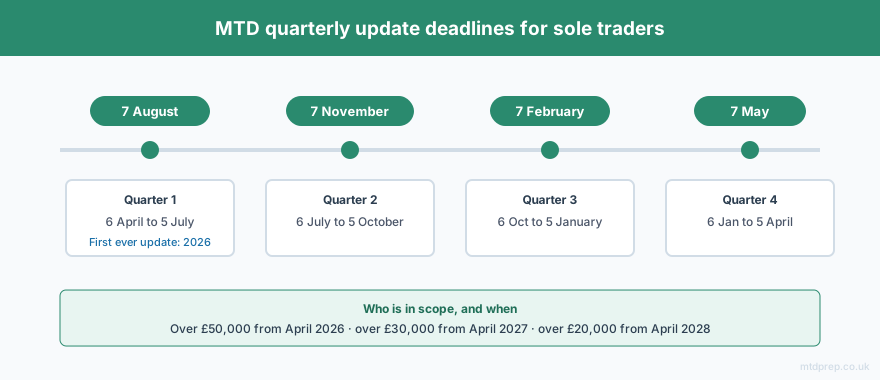
MTD for Income Tax starts on 6 April 2026 for anyone whose qualifying income from self-employment and property was over £50,000 in the 2024–25 tax year. The threshold drops to £30,000 from April 2027 and £20,000 from April 2028. Qualifying income means gross turnover before expenses — not profit — which pulls in a lot of people who assumed they were comfortably under the line.
The first update, due 7 August 2026, covers the quarter to 5 July. HMRC has confirmed a soft landing on late-submission penalty points for the first year, but that is a grace period on penalties, not a licence to skip the records.
Do You Have to Buy Accounting Software to Submit?
No. You can keep working in a spreadsheet and submit through bridging software.
Bridging software does one job: it takes your spreadsheet and files it with HMRC. 123 Sheets, Absolute Excel and VT are the established options, and they are inexpensive precisely because they are narrow. What they do not do is get the data into the spreadsheet for you. 123 Sheets, the market leader among them, tells PDF users to go and find a converter for that step.
So the shape of the problem is clear. Lloyds gives you a PDF. Bridging software takes a categorised spreadsheet. The gap in the middle — extraction and HMRC categorisation — is the work, and it is the reason so many sole traders conclude, wrongly, that they have to give in and buy a full subscription platform.
How MTDPrep Handles the Middle Step
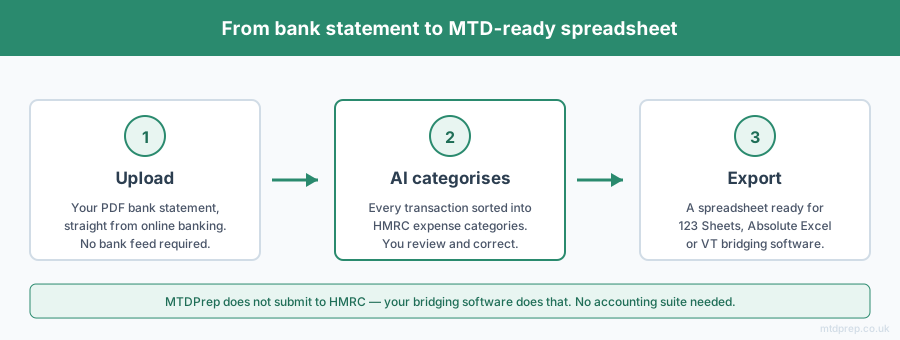
MTDPrep exists to close exactly that gap. You upload a PDF bank statement — Lloyds included — the AI extracts every transaction, categorises each one into HMRC-compliant expense categories, and you review and correct anything it has misread. You then export a spreadsheet already formatted for 123 Sheets, Absolute Excel or VT.
One honest note: we do not submit to HMRC and we never will — that is what your bridging software is for. No accounting suite, no Open Banking connection, no bank feed. Your statement stays a file you choose to upload.
Frequently Asked Questions
How do I download a Lloyds bank statement as a PDF?
Log in to Lloyds Internet Banking or the mobile app, select your account, open Statements, choose the statement period and use the download icon. Statements download one month at a time as PDF files.
How far back do Lloyds bank statements go online?
Lloyds Internet Banking provides access to statements up to seven years old, and the mobile app typically holds at least ten years of statement history.
Does a Lloyds PDF statement count as a digital record for Making Tax Digital?
No. MTD requires digital records of individual transactions held in software or a spreadsheet that can be linked to HMRC-recognised submission software. A PDF cannot be sorted, totalled or submitted from, so it does not meet the requirement on its own.
Can I use a Lloyds personal account for my sole trader business?
Legally you can, since a sole trader and their business are the same legal entity, though Lloyds' account terms may require a business account for trading use. For MTD it makes the work harder either way, because every quarter you have to separate business transactions from personal ones by hand.
Do I need accounting software to submit MTD with Lloyds statements?
No. You can keep records in a spreadsheet and submit through HMRC-recognised bridging software such as 123 Sheets, Absolute Excel or VT. A full accounting platform is not a requirement of Making Tax Digital.
When is my first MTD quarterly update due?
7 August 2026, covering the quarter to 5 July 2026, if you are in the first phase — qualifying income over £50,000 in 2024–25. Subsequent deadlines are 7 November, 7 February and 7 May.
Getting statements out of Lloyds is the easy half hour. The hard part is everything after: twelve PDFs, several hundred transactions, and a set of HMRC categories that have to be applied consistently enough to survive four quarterly submissions.
If you are a Lloyds sole trader staring down April 2026, the decision in front of you is not really which bank statement tool to use. It is whether you accept that MTD means buying accounting software you do not want. It does not.
Related: Making Tax Digital for Sole Traders 2026 · MTD Bridging Software Explained · HSBC Bank Statements and MTD
Found this useful? Add MTDPrep as a Google Preferred Source and our MTD guides will show up whenever you search the topics we cover.
MTDPrep is an independent product and is not affiliated with or endorsed by HMRC.