Making Tax Digital for Income Tax (MTD ITSA) is no longer on the horizon — it arrived on 6 April 2026. If you're a sole trader or landlord with gross income above £50,000, the rules are already in force. This post explains exactly who is mandated right now, what the quarterly deadlines look like for the 2026/27 tax year, what the penalty position is if you're late, and how to get compliant without buying full accounting software.
Who Has to Use Making Tax Digital from April 2026?
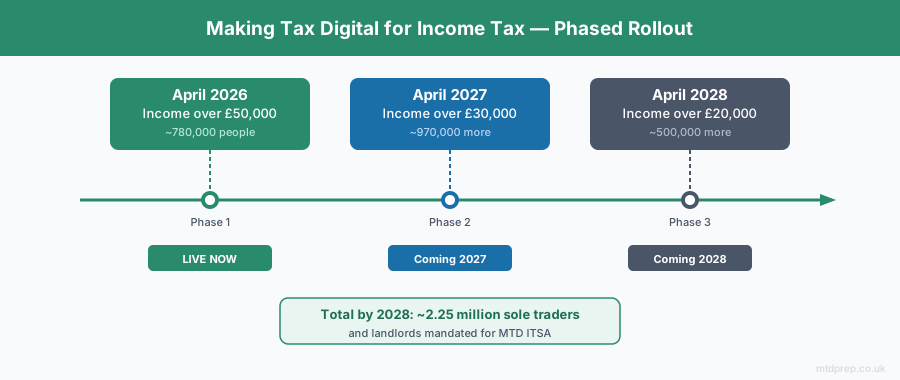
From 6 April 2026, MTD for Income Tax is mandatory for any sole trader or landlord whose qualifying income exceeds £50,000 per tax year. Qualifying income is the gross amount — your total income from self-employment and property combined, before any expenses or allowances are deducted.
HMRC estimates around 780,000 people fall into this first wave. If you were filing a Self Assessment tax return with more than £50,000 in business or rental income, you are now in scope.
Two further phases follow:
- April 2027: anyone with qualifying income above £30,000 (an estimated additional 970,000 people)
- April 2028: anyone with qualifying income above £20,000 (an estimated further 500,000)
By 2028, roughly 2.25 million sole traders and landlords will be using MTD for Income Tax. The trajectory is clear — if you're not in scope now, you will be soon.
What Does "Mandated" Actually Mean?
Being mandated means three things have legally changed for you:
Digital record-keeping is required. You can no longer keep your business income and expenses in a shoebox or an unapproved spreadsheet. Your records must be held digitally, in software that meets HMRC's requirements.
Quarterly updates must be submitted. Instead of a single annual Self Assessment return, you now send HMRC a summary of your income and expenses four times a year. These are not four mini tax returns — they are periodic updates. Your final tax calculation still happens at the end of the year via an End of Period Statement and Final Declaration.
You must use MTD-compatible software. HMRC will not accept quarterly updates through their old online portal. You need software that connects to their API — either directly, or via a bridging tool like 123 Sheets, Absolute Excel, or VT.
What Are the Quarterly Deadlines for 2026/27?
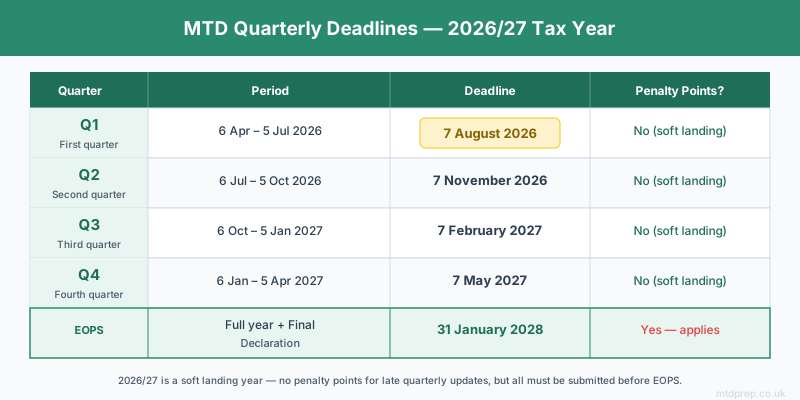
For the first wave of mandated taxpayers (those in scope from April 2026), the four quarterly periods and their submission deadlines are as follows:
| Quarter | Period | Submission deadline |
|---|---|---|
| Q1 | 6 April – 5 July 2026 | 7 August 2026 |
| Q2 | 6 July – 5 October 2026 | 7 November 2026 |
| Q3 | 6 October 2026 – 5 January 2027 | 7 February 2027 |
| Q4 | 6 January – 5 April 2027 | 7 May 2027 |
| End of Period Statement | Full year | 31 January 2028 |
The first Q1 deadline — 7 August 2026 — is already approaching for anyone who started from 6 April 2026.
What Happens If You Miss the April 2026 Start Date?
The good news is that 2026/27 is being treated as a soft landing year by HMRC. During this first year, HMRC will not issue penalty points for late quarterly updates. You still have to send them — you cannot skip the updates entirely, because HMRC requires all quarterly updates to be submitted before you can file your End of Period Statement. But if you submit a quarterly update late during 2026/27, you will not accumulate penalty points.
Late payment of any tax owed is a different matter. From April 2026, you have 30 days from the payment due date before any late payment penalty kicks in. That 30-day window reduces to 15 days from 2027/28.
From the 2027/28 tax year onwards, the soft landing ends and a full points-based penalty system applies:
- Each missed quarterly update earns one penalty point
- Reaching four points triggers a £200 financial penalty
- Every missed submission after that point adds a further £200
- Points can be cleared by meeting all deadlines for a sustained period
The message is: use 2026/27 to get your process in order, before penalties become real in 2027.
Do You Need Accounting Software to Comply?
No — and this is worth saying clearly, because the assumption many people make is that MTD means buying Xero or subscribing to a full accounting platform. It does not.
What MTD requires is digital records and a way to submit quarterly updates. A significant number of sole traders and landlords who already use spreadsheets can comply via MTD bridging software — tools like 123 Sheets, Absolute Excel, and VT that connect your spreadsheet data to HMRC's API. These are substantially cheaper than full accounting suites and require no change to how you actually do your bookkeeping.
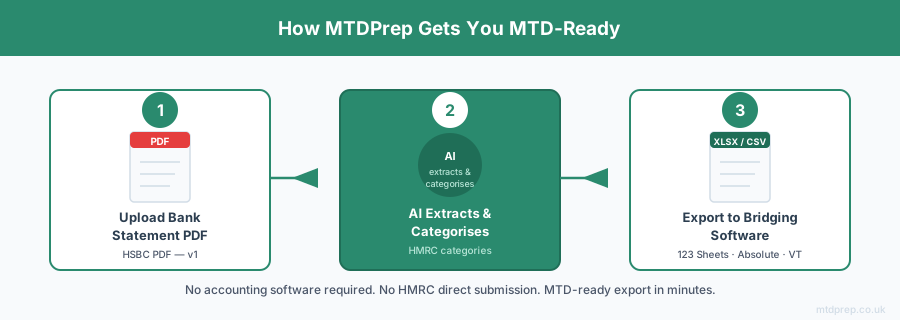
The challenge bridging software tools don't solve is getting your data in the right format in the first place — particularly if your bank doesn't make transaction exports straightforward. That is precisely the problem MTDPrep is built to address: you upload your bank statement PDF, the AI extracts and categorises your transactions into HMRC-compliant expense categories, and you export a spreadsheet that your bridging software can use.
What HMRC Expense Categories Apply?
When you submit a quarterly update, your expenses must be categorised according to HMRC's approved categories. For self-employed sole traders these include:
- Cost of goods / cost of sales — stock purchased for resale
- Car, van and travel expenses — including fuel, insurance, and business mileage
- Wages, salaries and other staff costs
- Rent, rates, power and insurance — for business premises
- Repairs and maintenance — of business property and equipment
- Phone, fax, stationery and other office costs
- Advertising and business entertainment expenses
- Interest on bank and other loans
- Bank, credit card and other financial charges
- Irrecoverable debts written off
- Accountancy, legal and other professional fees
- Depreciation and loss/profit on sale of assets
- Other business expenses
Landlords use a separate but parallel set of property-specific categories. Getting the categorisation right from the start is important — it is far harder to correct miscategorised transactions at year-end than to do it as you go.
Frequently Asked Questions
Who has to use Making Tax Digital from April 2026?
Sole traders and landlords with qualifying income (gross income from self-employment and property, before expenses) above £50,000. HMRC estimates around 780,000 people are in scope for this first phase.
What is the threshold for MTD ITSA in 2026?
£50,000 in qualifying income. This drops to £30,000 from April 2027 and £20,000 from April 2028. Qualifying income means gross self-employment and property income combined, before any deductions.
What happens if I missed the April 2026 start date?
During 2026/27, HMRC is not issuing penalty points for late quarterly updates — it is treated as a soft landing year. You should still get your quarterly submissions in as soon as possible, because you cannot file your End of Period Statement without them. Penalty points apply from 2027/28 onwards.
What are the MTD quarterly deadlines for 2026/27?
Q1 (6 Apr–5 Jul 2026) is due by 7 August 2026. Q2 (6 Jul–5 Oct) by 7 November. Q3 (6 Oct–5 Jan) by 7 February 2027. Q4 (6 Jan–5 Apr) by 7 May 2027. The End of Period Statement is due 31 January 2028.
Do I need accounting software like Xero to comply with MTD?
No. MTD requires digital records and MTD-compatible submission software, but that does not have to be a full accounting suite. Bridging software (such as 123 Sheets, Absolute Excel, or VT) connects a spreadsheet to HMRC and is significantly cheaper than subscription accounting platforms.
What is the MTD penalty system?
From 2027/28, a points-based system applies. Each late quarterly update earns one point. At four points, a £200 penalty is charged. Each subsequent late submission adds a further £200. Points are cleared by meeting all deadlines consistently for a set period.
What counts as qualifying income for MTD ITSA?
Qualifying income is the total gross income from self-employment and property — before any expenses, allowances, or deductions. If you have both a sole trader business and rental income, both amounts are added together to determine whether you cross the threshold.
Making Tax Digital April 2026 is here — and if you're above the £50,000 threshold, the clock is already running. The first quarterly deadline arrives on 7 August 2026, and 2026/27 is your window to get a compliant process in place before penalties follow from 2027/28. You do not need to buy accounting software to comply. MTDPrep is designed for exactly this situation: bank statement PDF in, HMRC-categorised spreadsheet out, ready for bridging software submission.
Related: Making Tax Digital for Sole Traders 2026 · Making Tax Digital for Landlords · HSBC Bank Statements and MTD
Found this useful? Add MTDPrep as a Google Preferred Source and our MTD guides will show up whenever you search the topics we cover.
MTDPrep is an independent product and is not affiliated with or endorsed by HMRC.