If you've received a letter from HMRC, or seen the phrase "Making Tax Digital" pop up from your bank or your accountant and thought what on earth does this actually mean for me? — this is the explainer you need. No jargon, no acronym soup. Just what Making Tax Digital for Income Tax is, whether it applies to you, and what you'll actually have to do differently.
The short version: Making Tax Digital for Income Tax (often shortened to MTD ITSA) is the biggest change to how self-employed people and landlords report their income to HMRC in a generation. From April 2026 it replaces the once-a-year Self Assessment tax return with quarterly digital updates. If that sounds like more work, this guide explains why it doesn't have to be — and how people who currently keep their books in a spreadsheet can stay compliant without buying full accounting software.
What Is Making Tax Digital for Income Tax?
Making Tax Digital for Income Tax is a new HMRC system that requires self-employed people and landlords to keep digital records and send HMRC an update on their income and expenses every three months, instead of filing one Self Assessment return each year.
There are two core requirements. First, you must keep your business records digitally — in software or a compatible spreadsheet, not on paper or in your head. Second, you must submit a quarterly update to HMRC using MTD-compatible software four times a year, followed by a single annual Final Declaration that replaces the old Self Assessment return.
That's the whole idea. HMRC wants a steadier, digital stream of information rather than one big annual document. The name is literal: your tax records go digital, and they get sent more often.
Who Does Making Tax Digital for Income Tax Apply To?
MTD for Income Tax applies to sole traders and landlords whose combined gross income from self-employment and property is above a set threshold. It is being introduced in stages based on that income level.
From April 2026, it is mandatory if your gross income from self-employment and property combined is more than £50,000 a year. From April 2027, the threshold drops to £30,000. From April 2028, it falls again to £20,000. Across those three phases, an estimated 2.25 million sole traders and landlords will be brought into the system.
Two things trip people up here. First, the threshold is based on gross income — your total takings before expenses — not your profit. Someone with £52,000 of turnover and £15,000 of costs is still in scope, even though their profit is well under £50,000. Second, income from self-employment and property is added together. A landlord earning £30,000 from rent who also does £25,000 of freelance work has £55,000 of combined gross income, and is therefore mandated from April 2026.
It does not apply to income from partnership profit shares, dividends, savings, PAYE employment, or pensions.
What Actually Changes Compared to Self Assessment?
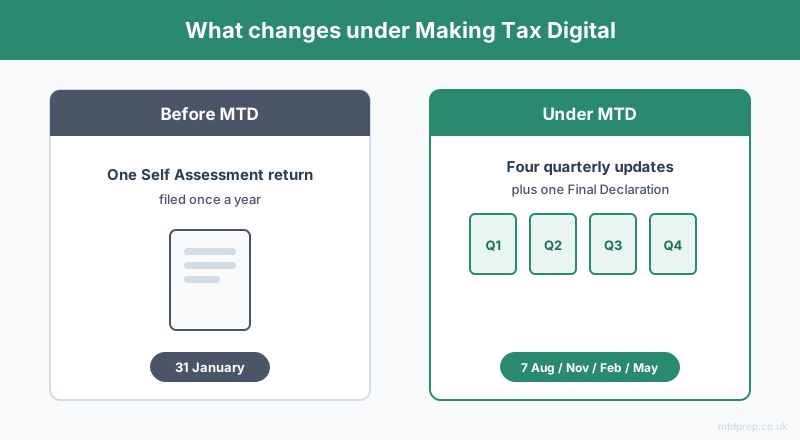
The biggest change is frequency: instead of one Self Assessment return each January, you send HMRC four quarterly updates during the year plus one Final Declaration after it ends.
Under the old system, most people gathered a year's worth of receipts and bank statements around Christmas, filed one online return by 31 January, and forgot about it until the following year. Under MTD, that annual scramble is replaced by a rhythm of shorter, regular submissions. Each quarterly update is a summary of your income and expenses for that three-month period, categorised into HMRC's expense categories.
Importantly, the quarterly updates are cumulative running totals, not final figures — you're not calculating your tax bill four times a year. The actual tax calculation and any final adjustments happen once, in the Final Declaration, which keeps the familiar 31 January deadline. For the 2026/27 tax year, that Final Declaration is due by 31 January 2028.
When Are the Making Tax Digital Deadlines?
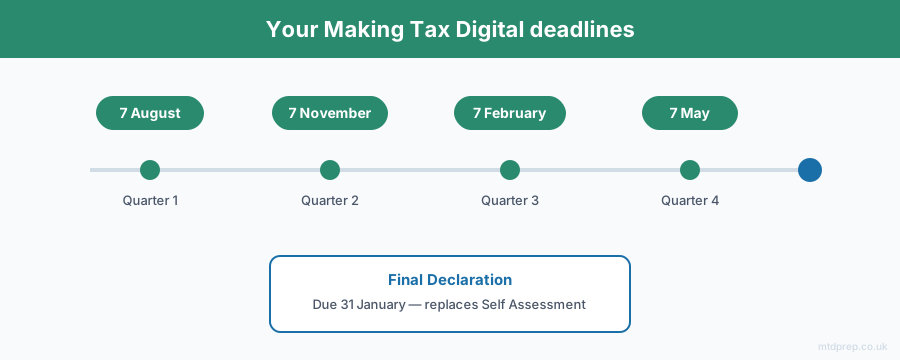
Using the standard tax-year quarters, the four quarterly update deadlines are 7 August, 7 November, 7 February and 7 May. The Final Declaration is due by 31 January following the end of the tax year.
The standard quarters end on 5 July, 5 October, 5 January and 5 April, and each update is due one month and two days later — which is why the dates always land on the 7th. These deadlines are fixed regardless of your own accounting year-end, so everyone in the system works to the same calendar.
Miss a deadline and HMRC applies a points-based penalty system: one point per missed submission, and once you reach four points you're charged a £200 penalty. It's designed to be forgiving of a single slip but to bite if late submission becomes a habit.
Do I Need to Buy Accounting Software for Making Tax Digital?
No. This is the single most common misconception about MTD. You need MTD-compatible software to submit your updates, but that does not have to be a full accounting suite with its own monthly subscription.
A whole category of tools called bridging software exists precisely for people who want to keep working in a spreadsheet. Bridging software — such as 123 Sheets, Absolute Excel, or VT — takes the figures from your spreadsheet and submits them to HMRC in the MTD format. You keep your familiar spreadsheet workflow; the bridging tool handles the digital link to HMRC. For a sole trader or landlord who resents the cost and complexity of a full accounting platform, this is a genuinely lighter path to compliance.
The catch is getting your data into that spreadsheet in the first place, correctly categorised — which is where a lot of the real work sits.
How Does MTDPrep Fit In?
MTDPrep is built for exactly the person this article is written for: a UK sole trader or landlord who keeps their books in a spreadsheet, doesn't want to buy full accounting software, and now needs MTD-ready records.
You upload your bank statement PDF, and the AI reads each transaction and assigns it to the correct HMRC expense category — income, motor, office costs, repairs, professional fees, and so on. You review the categorisation and correct anything that needs it, then export a spreadsheet formatted for your chosen bridging software. From there, 123 Sheets, Absolute Excel, or VT handles the submission to HMRC. No accounting suite, no rekeying, no starting from a blank spreadsheet each quarter.
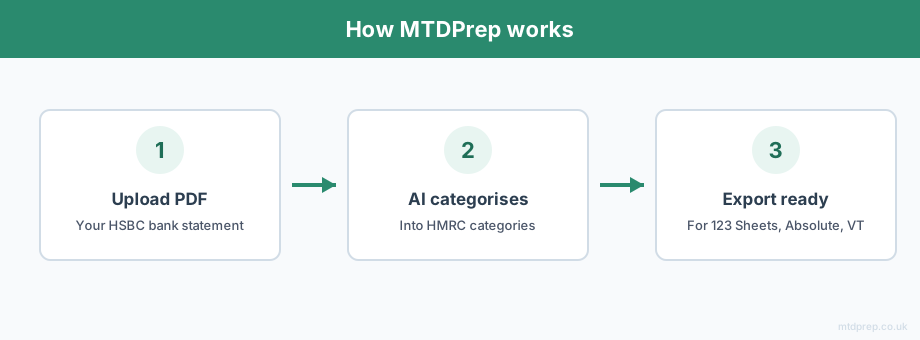
The point is to make the quarterly rhythm of MTD manageable for people who would otherwise be doing it all by hand.
Frequently Asked Questions
What does Making Tax Digital for Income Tax mean in simple terms?
It means self-employed people and landlords must keep digital records and send HMRC a summary of their income and expenses every three months, using compatible software, instead of filing a single Self Assessment return once a year. An annual Final Declaration then replaces the old tax return.
When does Making Tax Digital for Income Tax start?
It starts in April 2026 for sole traders and landlords with combined gross income from self-employment and property above £50,000. The threshold drops to £30,000 from April 2027 and £20,000 from April 2028.
Is the £50,000 threshold based on profit or turnover?
It is based on gross income — your total business and property takings before expenses — not your profit. Income from self-employment and property is added together to test against the threshold.
Do I have to submit my tax four times a year now?
You submit four quarterly updates, but these are running summaries of income and expenses, not four separate tax calculations. Your actual tax is worked out once a year in the Final Declaration, which keeps the 31 January deadline.
Do I need to buy accounting software for Making Tax Digital?
No. You need MTD-compatible software to submit, but bridging software such as 123 Sheets, Absolute Excel, or VT lets you keep working in a spreadsheet and simply submits those figures to HMRC. A full accounting suite is not required.
What happens if I miss a Making Tax Digital deadline?
HMRC uses a points-based system: you get one penalty point for each missed submission, and when you reach four points you are charged a £200 penalty. A single late submission won't be fined, but repeated lateness will be.
What are the Making Tax Digital quarterly deadlines?
Using the standard tax-year quarters, the deadlines are 7 August, 7 November, 7 February and 7 May, with the annual Final Declaration due by 31 January after the tax year ends.
Making Tax Digital sounds more daunting than it is once the jargon is stripped away: keep digital records, send HMRC a quarterly summary, confirm the year's figures once at the end. If you already do your own books in a spreadsheet, you don't need to change to expensive accounting software to comply — you need a reliable way to get your bank statement into MTD-ready, correctly categorised records. That's what MTDPrep is built to do.
Related: Making Tax Digital for Sole Traders 2026 · What Is MTD ITSA? · HSBC Bank Statements and MTD
Found this useful? Add MTDPrep as a Google Preferred Source and our MTD guides will show up whenever you search the topics we cover.
MTDPrep is an independent product and is not affiliated with or endorsed by HMRC.