If you're self-employed and you've heard the phrase "Making Tax Digital" without ever getting a straight answer about what it means for you, you're not alone. HMRC's Making Tax Digital for Income Tax (MTD ITSA) is the biggest change to how sole traders report tax since Self Assessment was introduced, and it's already live for the highest earners. This post explains, in plain terms, who's affected, when it starts, and exactly what you'll need to do — without assuming you already know the jargon.
What Is Making Tax Digital for the Self-Employed?
Making Tax Digital for Income Tax replaces the old once-a-year Self Assessment return with four quarterly updates plus a year-end final declaration, all submitted through MTD-compatible software rather than HMRC's online portal or a paper form. Instead of gathering everything up in January and filing once, you'll be keeping digital records throughout the year and sending HMRC a summary of income and expenses every three months.
It applies to self-employed sole traders and landlords whose gross income is above set thresholds — not to limited companies, and not to employees who only receive PAYE income. If your only income is a salary, MTD for Income Tax doesn't apply to you.
Do I Need to Worry About MTD in 2026?
That depends on your gross income, not your profit. HMRC counts your total turnover from self-employment and property income combined — before you deduct any expenses.
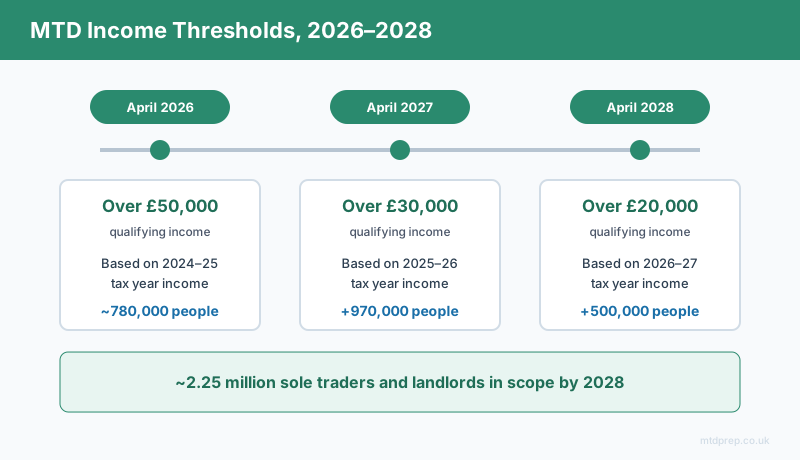
| From | Qualifying income threshold | Based on tax year | Estimated people affected |
|---|---|---|---|
| 6 April 2026 | Over £50,000 | 2024–25 | ~780,000 |
| 6 April 2027 | Over £30,000 | 2025–26 | +970,000 |
| 6 April 2028 | Over £20,000 | 2026–27 | +500,000 |
By 2028, roughly 2.25 million sole traders and landlords will be in scope. If your gross self-employment and property income (combined, if you have both) was over £50,000 in the 2024–25 tax year, you're mandated from this April and should already be preparing. If you're under £50,000 now but expect to cross £30,000 or £20,000 in future years, MTD is coming for you too — just not yet.
What Do I Actually Have to Do Under MTD?
Once you're mandated, there are three ongoing obligations:
Keep digital records. Every business transaction — income and expenses — needs to be recorded digitally as it happens, rather than reconstructed from a shoebox of receipts at year-end. This doesn't mean you need accounting software; a structured spreadsheet counts, provided it can connect to HMRC via compatible bridging software.
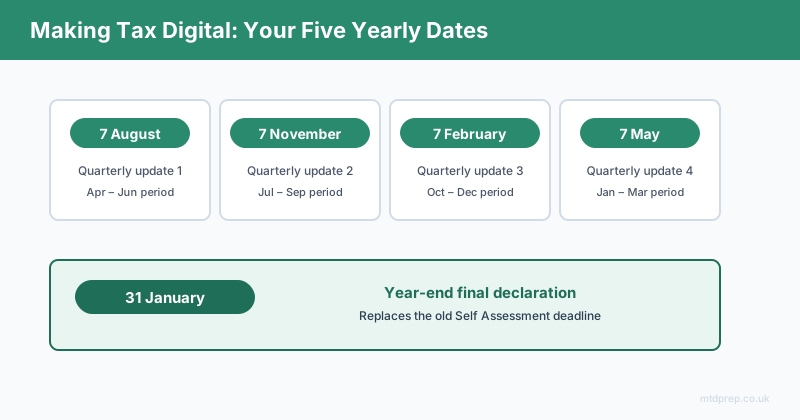
Submit four quarterly updates. These are due by 7 August, 7 November, 7 February and 7 May each year, covering rolling three-month periods. Each update is a summary total of income and expenses for that quarter — not a full tax calculation. If you run more than one business (for example, a trade plus a rental property), you'll need a separate quarterly update for each one.
Submit a year-end final declaration. Due by 31 January following the end of the tax year, this replaces your old Self Assessment return and finalises your total tax position, including any reliefs, allowances, or adjustments the quarterly updates didn't capture.
Do I Need to Buy Accounting Software?
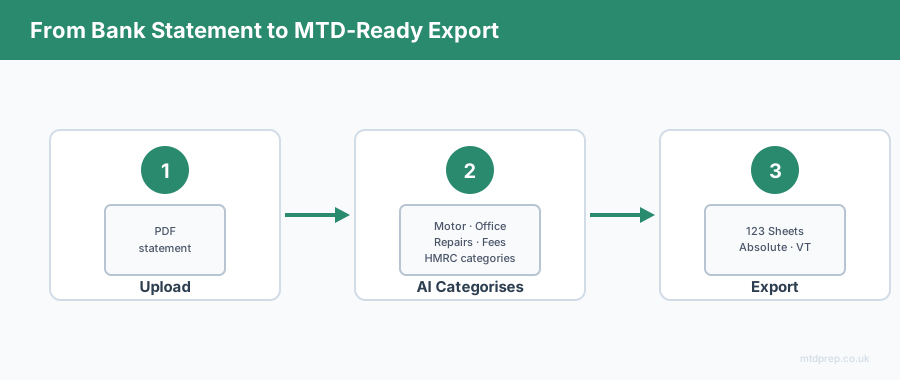
No — and this is the part most guides gloss over. MTD requires MTD-compatible software, not a specific brand of accounting platform. Bridging software such as 123 Sheets, Absolute Excel, or VT exists specifically so that people who already manage their books in a spreadsheet can carry on doing so, while still submitting digitally-linked, compliant updates to HMRC.
The catch is the "digitally linked" requirement: once your figures are digital, they need to flow through to your submission without manual re-typing or copy-pasting between formats. That's the step that trips people up — going from a PDF bank statement to a clean, correctly categorised spreadsheet that a bridging tool can pick up. That gap between "PDF statement" and "MTD-ready spreadsheet" is exactly what MTDPrep is built to close, without needing you to move your whole financial life into a subscription accounting platform you don't otherwise want.
What Counts as a Digital Record?
HMRC's definition is narrower than most people assume. A digital record means each individual transaction — not a monthly total — is captured in a compatible digital format, categorised under HMRC's expense headings (motor expenses, office costs, repairs and maintenance, professional fees, and so on), and able to be transferred electronically into your submission software without manual re-entry.
A photo of a receipt isn't a digital record on its own. A spreadsheet you manually retype from a PDF statement technically is, but it's slow and error-prone. The compliant middle ground most sole traders land on is: bank statement → digitally extracted and categorised transactions → bridging software submission.
What Happens If I Miss a Deadline?
HMRC has confirmed a points-based penalty system for MTD, similar to the one already used for VAT. Each missed quarterly update earns a penalty point; once you hit a threshold, a fixed financial penalty applies, and further missed deadlines add further penalties. Persistent late submission escalates quickly, so the safest approach is treating each quarterly deadline with the same seriousness as the old January Self Assessment date — four times a year, not once.
Frequently Asked Questions
Does Making Tax Digital apply to all self-employed people?
No. It applies only to sole traders and landlords whose combined gross income from self-employment and property is above the relevant threshold — £50,000 from April 2026, £30,000 from April 2027, and £20,000 from April 2028. It does not apply to limited companies or to income taxed purely through PAYE.
Is qualifying income based on profit or turnover?
Turnover. HMRC looks at gross income before expenses are deducted, so a business with high turnover but low profit margins can still be mandated even if take-home profit is modest.
Do I have to use accounting software like a full subscription platform?
No. You need MTD-compatible software, which includes bridging software such as 123 Sheets, Absolute Excel, or VT. These let you keep working from a spreadsheet as long as the figures are digitally linked through to your HMRC submission.
How many quarterly updates do I need to submit each year?
One set of four quarterly updates per business. If you have both a sole trade and a rental property, you'll submit two separate sets of quarterly updates — eight submissions a year in total.
What are the actual quarterly deadlines?
7 August, 7 November, 7 February and 7 May, covering the preceding three-month period, followed by a year-end final declaration due by 31 January.
What happens if my income drops below the threshold after I've started MTD?
HMRC has indicated income is reassessed each year based on your two-years-prior tax return, so it's possible to move in and out of mandation as your income changes. Check your specific position with an accountant or HMRC guidance, as the exact exit rules are still being finalised.
Can I use a spreadsheet instead of buying new software?
Yes, provided your spreadsheet records are digitally linked to MTD-compatible bridging software for submission — you cannot manually retype totals from a spreadsheet into HMRC's system and still be compliant.
Making Tax Digital is a genuine change in how often and how you report to HMRC, but it isn't a requirement to abandon the way you already manage your books. Keeping clean digital records through the year and knowing your quarterly dates is most of the battle — the rest is picking tools that fit how you already work rather than forcing you into a system built for someone else's business.
Related: Making Tax Digital for Sole Traders 2026 · Making Tax Digital for Landlords · HSBC Bank Statements and MTD
Found this useful? Add MTDPrep as a Google Preferred Source and our MTD guides will show up whenever you search the topics we cover.
MTDPrep is an independent product and is not affiliated with or endorsed by HMRC.